
Team & Settings
The Team & Settings section is used to manage operators, internal tasks, and account-level Engage configuration.
Use this section to control who can work in Engage, assign follow-up tasks, configure email behavior, manage integrations, authenticate domains, and adjust Unibox settings.
Operators
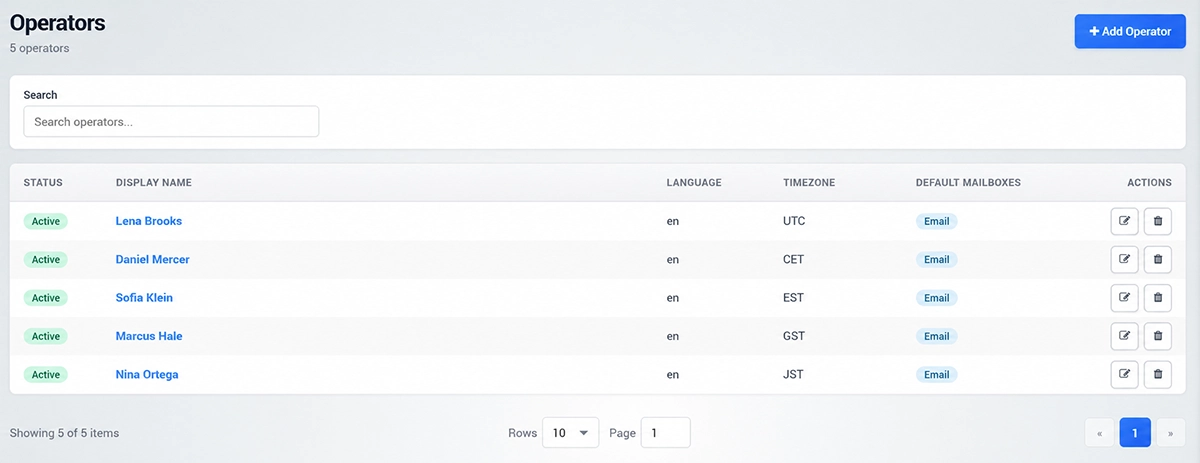
Operators are team members who can use Engage.
The Operators page shows active users, display names, language, timezone, default mailboxes, and available actions.
Use Add Operator to create a new operator.
Each operator can be connected with default mailboxes, so customer communication and replies can be routed correctly.
Keep operator records up to date when team members change roles or when new people need access to Engage.
Tasks
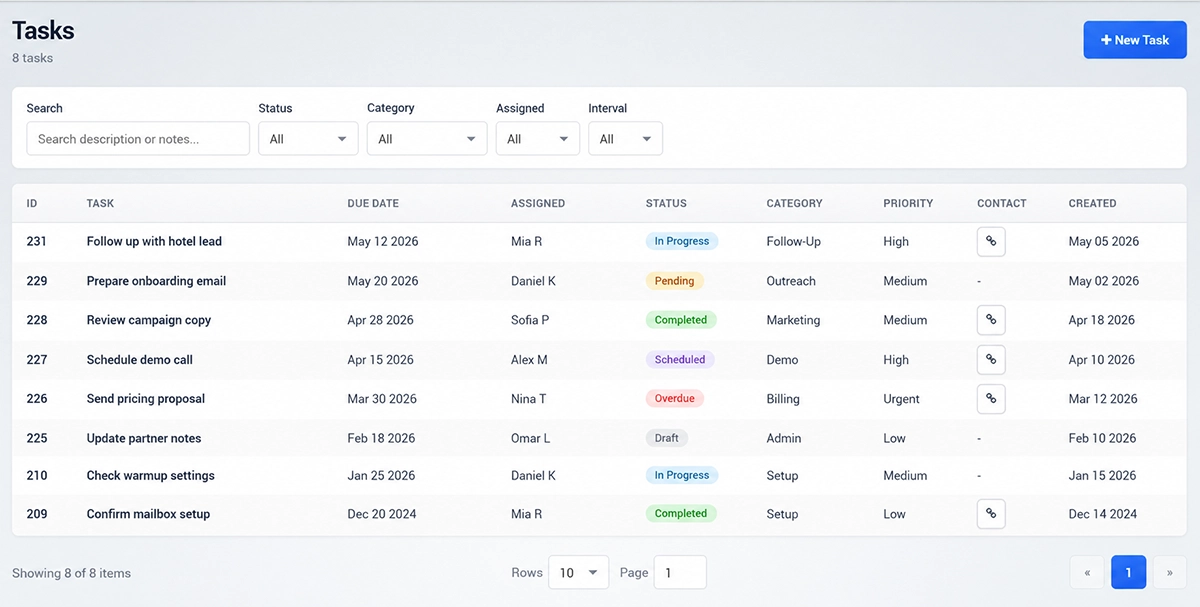
Tasks help your team organize follow-ups and reminders.
Use the Tasks page to create, search, filter, and track internal work related to contacts, leads, campaigns, or customer communication.
You can filter tasks by status, category, assigned operator, and interval.
Creating a Task
Click New Task to create a task.
A task can include a task description, due date, status, category, assigned operator, priority, notes, alarm time, and reminder option.
Use reminders for important follow-ups that should not be missed.
Tasks are useful for sales follow-up, support reminders, customer checks, campaign preparation, or manual review.
General Settings
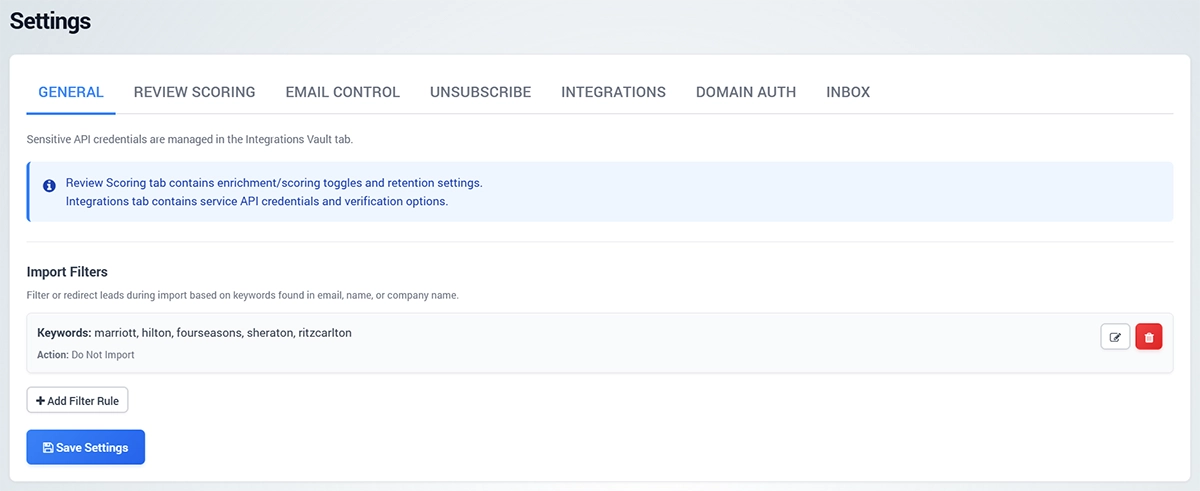
General Settings contain account-level options used by Engage.
The General tab includes import filters that can filter or redirect leads during import based on keywords found in email, name, or company name.
Use Add Filter Rule when imported leads should be handled differently depending on matching criteria.
Sensitive API credentials are managed separately in the Integrations tab.
Review Scoring
Review Scoring controls enrichment, intent scoring, and data retention.
You can enable enrichment or OpenAI intent scoring when these options are available and configured.
Data retention settings control how long Engage keeps evidence, suppressed archives, logs, and engagement data.
The review rules JSON configuration is used for contact review and intent scoring logic.
Only edit JSON configuration when you are sure how the rules should work.
Email Control
Email Control manages account-level email sending and tracking behavior.
You can enable or disable email sending activity, track opens, track link clicks, and track replies by default.
The tracking URL is used for tokenized click links.
Provider and recipient safeguards can prevent tracking for specific mailbox providers such as Gmail, Outlook/Hotmail, or Yahoo.
You can also enable text-only email defaults and logging for outreach activity and webhook events.
Use these settings carefully, because they affect campaigns, outreach, and mailbox behavior across the account.
Unsubscribe
The Unsubscribe tab controls unsubscribe behavior for outreach and broadcast emails.
You can configure the one-click base URL, mailto unsubscribe address, unsubscribe footer, footer mode, company address line, translations, and optional HTML footer template.
The preview shows the unsubscribe headers that will be used in outgoing email.
Use this section to make unsubscribe handling clear and consistent across marketing emails.
Integrations
The Integrations tab stores account-level credentials for external services.
Available integrations can include Debounce, DataForSEO, OpenAI, SendGrid, Google, and additional tools configured through JSON.
Use this section to store API keys and service credentials used by Engage features such as email verification, enrichment, scoring, sending, or domain authentication.
Keep credentials private and update them when provider access changes.
Domain Auth
Domain Auth is used to authenticate sending domains.
For SendGrid and Cloudflare setups, enter the domain and subdomain, then run authentication to create and validate the required DNS records.
Domain authentication helps improve email trust and delivery.
Authenticate the sending domain before running larger campaigns.
Inbox
Inbox settings control how Unibox handles conversations, mailbox visibility, and notifications.
Others Sync controls whether emails from unknown senders are saved in the Others tab.
Personal Mailbox Visibility controls whether personal mailbox conversations are visible to all operators or only the mailbox owner.
Notification Mode controls who gets notified when a new reply arrives in Unibox.
Send Operator Messages controls whether replies and new Unibox messages are sent immediately or queued through the outbox pipeline.
IMAP SSL Certificate Validation should normally stay enabled. Ignore IMAP SSL certificate errors only for special cases such as self-signed or invalid IMAP certificates.
Setup Wizard
The Setup Wizard helps configure the initial Engage environment.
Use it when setting up Engage for the first time or when you need to create the basic operator, mailbox, and sending provider configuration.
Best Practice
Create operators before assigning tasks or routing conversations.
Connect mailboxes and providers before sending campaigns.
Check email control, unsubscribe, and domain authentication before outreach starts.
Use tasks for follow-ups that require manual action.
Keep API credentials and domain authentication settings updated to avoid delivery or integration issues.