
Configuration
The Configuration section is where you define how charging works for both Play and Pay and User Pre-paid sessions.
Cafe & Kiosk supports two charging models for sessions: Play and Pay for walk-in, on-the-spot billing, and User Prepaid for accounts that already have time or credit.
In Play and Pay, you create configurations (for example, “PC Standard”), enable/disable them, set the price and pricing type (such as Per Hour), and apply billing rules like Minimum Charge and Start Charge, plus currency and a short description.
In Pre-paid, you control which Splash Page and Internet Plan are used for free access and refills, and you can customize the Refill Offer Text and whether the refill prompt is shown (Refill Position).
Play and Pay
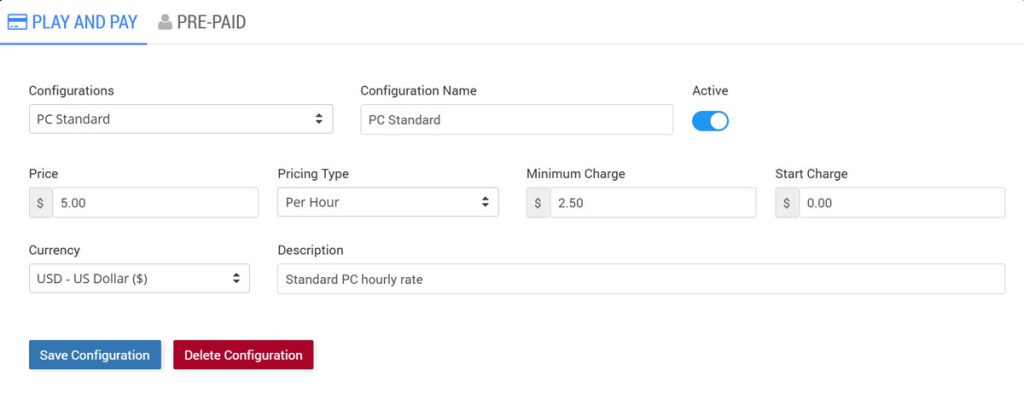
In Play and Pay, the operator selects a station, sets either a time limit or a cost limit, and starts the session immediately.
When the session ends, the system generates a bill item (for example, “PC 2 Session 1 min”) and sends it to the POS cart.
The cashier completes payment by selecting a method (Cash, Card, Wallet, or Split), and Cloud Station issues a receipt with transaction ID, date/time, station, items, and totals.
Pre-paid
Besides the Splash Page and Internet Plan selection, Pre-Paid allows you to choose which plans are displayed on the login page using Add Internet Plans. This gives you full control over the prepaid options users can see and extend.
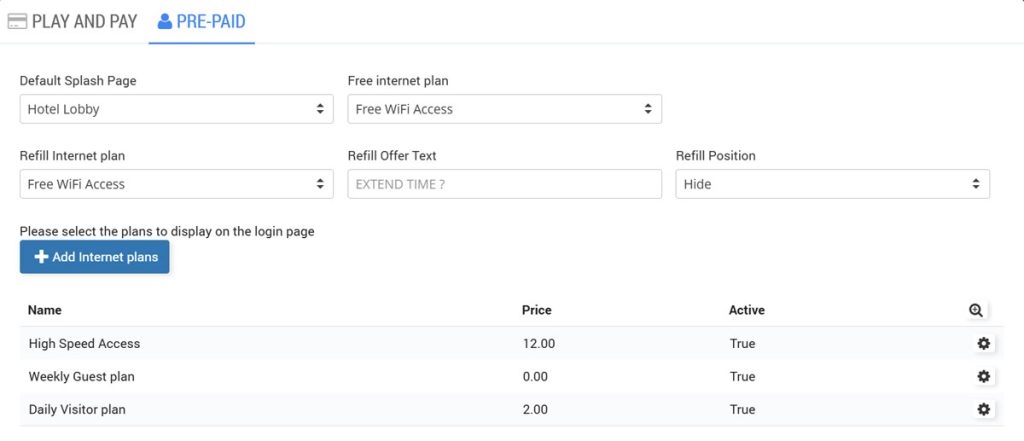
WiFi Hotspot Internet plans can also be used here, allowing the same login page to support both WiFi access and Cafe & Kiosk usage where enabled.