
Categories
The Categories section is used to organize Experiences, Restaurants, Services, and Store items in Digital Guide.
Categories help group related content together so customers can browse available offers more easily.
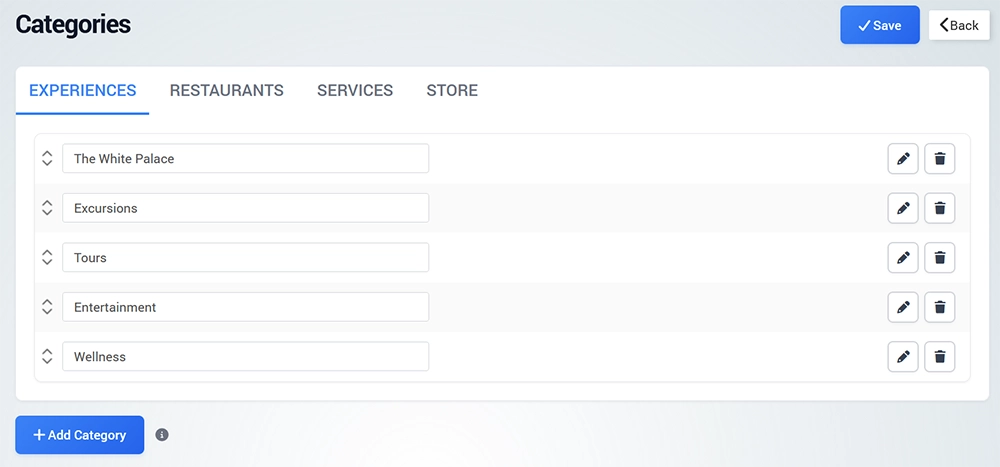
Each major Digital Guide content section can use its own categories. For example:
Experiences – Tours, Activities, Attractions, Excursions
Restaurants – Restaurants, Bars, Cafés, Fine Dining
Services – Transportation, Spa, Room Service, Rentals
Store – Amenities, Gifts, Food & Beverage, Merchandise
Create a Category
Open Categories and click Add Category.
Enter the Category Name and save the category.
After the category is created, you can configure its Image and Layout. The category can then be selected when creating or editing an Experience, Restaurant, Service, or Store item.
Category Image and Layout
Each category can include an image and a layout that determines how its content is displayed in Digital Guide.
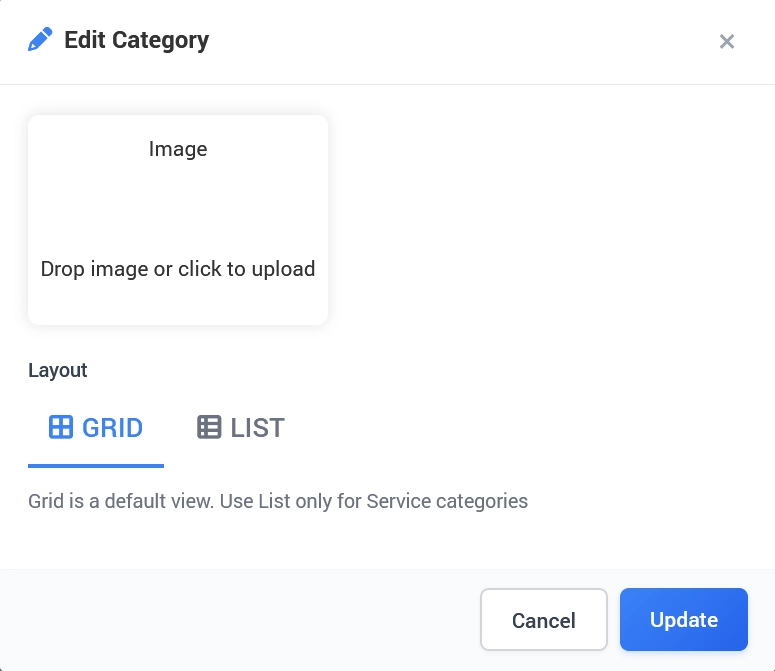
Image
Upload an image that represents the category.
You can drag an image into the upload area or click the area to select an image from your device.
Layout
Choose how the category content will be displayed:
Grid – the default layout for categories.
List – a list-based layout intended only for Service categories.
For most categories, keep Grid selected. Use List only when configuring Service categories that should be displayed in a list format.
Click Update to save the category settings.
Using Categories
When creating Digital Guide content, select the category that best describes the item.
For example:
A city walking tour can be assigned to Tours
A cocktail bar can be assigned to Bars
Airport transportation can be assigned to Transportation
A souvenir can be assigned to Gifts
Using clear categories keeps related content organized and makes it easier to maintain a larger Digital Guide.
Organizing Digital Guide Content
Create categories based on the type of content you actually offer.
Avoid creating unnecessary categories with only one item unless they provide useful separation for customers.
Use clear and recognizable names so the purpose of each category is immediately understandable.
Categories can then be reused when adding additional items of the same type.