
Dashboard
The Dashboard provides a quick overview of Digital Guide activity, content, reservations, requests, check-ins, payments, and revenue.
It combines key totals, recent activity, and performance statistics so you can monitor important Digital Guide data from one place.
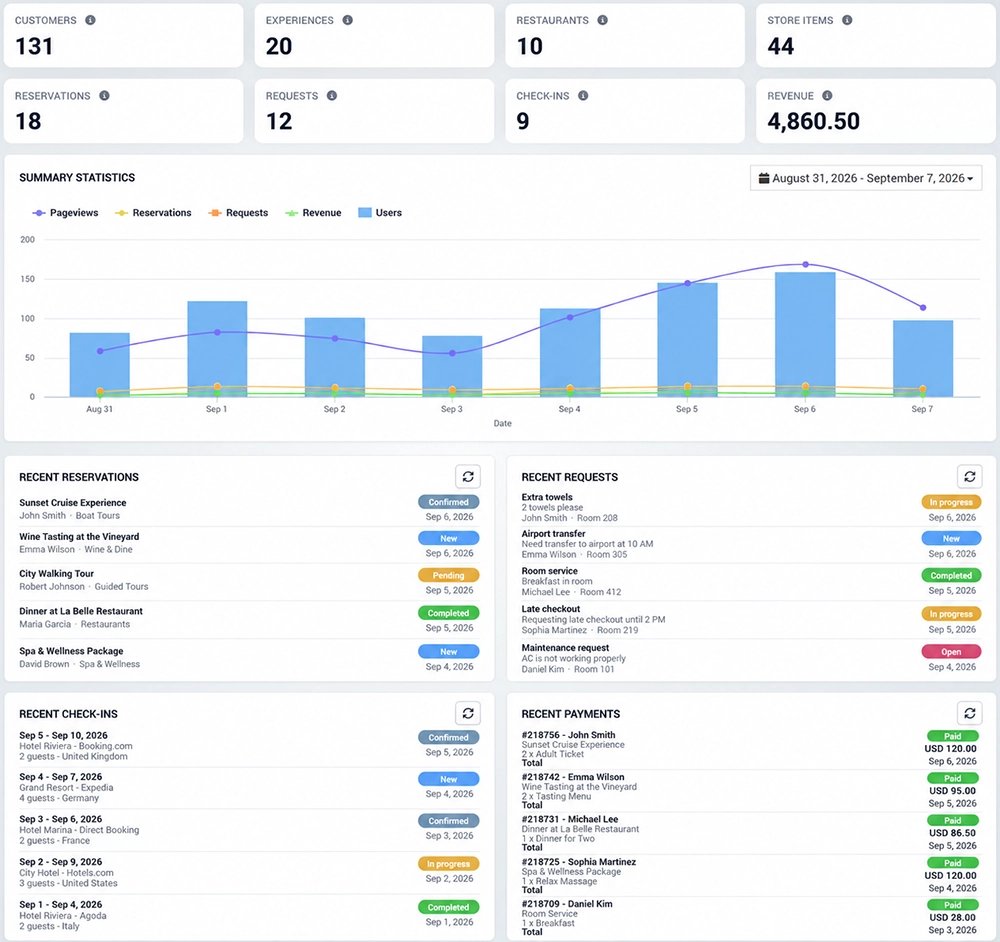
Dashboard Overview
The top section displays the main Digital Guide metrics:
Customers – total number of customer records.
Experiences – total number of Experiences available in Digital Guide.
Restaurants – total number of configured restaurants.
Store Items – total number of products and items available in the Store.
Reservations – total number of reservations created through Digital Guide.
Requests – total number of customer service requests.
Check-Ins – total number of recorded customer check-ins.
Revenue – total revenue generated through Digital Guide transactions.
These values provide a quick overview of the current activity and content available in your Digital Guide account.
Summary Statistics
The Summary Statistics section provides a visual overview of Digital Guide activity for the selected date range.
The chart includes:
Pageviews – number of times Digital Guide pages were viewed.
Reservations – reservations created during the selected period.
Requests – service requests submitted by customers.
Revenue – revenue generated during the selected period.
Users – users who accessed Digital Guide during the selected period.
Use the date selector in the upper-right corner to review statistics for a specific period.
This makes it easy to compare activity over time and identify changes in customer engagement, reservations, requests, and revenue.
Recent Reservations
The Recent Reservations panel displays the latest reservations created through Digital Guide.
Depending on the reservation, you can review information such as:
Customer or guest
Experience or venue
Party size
Reservation date and time
Current reservation status
This allows staff to quickly review recent booking activity directly from the Dashboard.
Recent Requests
The Recent Requests panel displays the latest service requests submitted by customers.
Requests can include services such as room service, transportation, additional amenities, spa bookings, late checkout, or other services configured in Digital Guide.
The panel provides quick access to the request details and current status.
Recent Check-Ins
The Recent Check-Ins panel shows the latest customer check-in activity.
It can be used to review recently recorded check-ins together with the related customer, location, room, or service information.
Recent Payments
The Recent Payments panel displays the latest transactions processed through Digital Guide.
Payment information may include:
Transaction or order reference
Purchased items or services
Transaction date
Total amount
Payment status
This provides a quick overview of recent paid activity without opening the individual payment or order records.
Refreshing Dashboard Data
The Recent Reservations, Recent Requests, Recent Check-Ins, and Recent Payments panels include a refresh option.
Use the refresh button to update the displayed information and load the latest available activity.