
Speed Boost
Speed Boost option can be used to increase or decrease user Internet access speed during a specific time interval.
You can use this feature to create happy hour, increase speed during the night, or grant-specific account group high speed in the desired time interval.
To configure it, please create a usage schedule template that will be used to activate speed change.
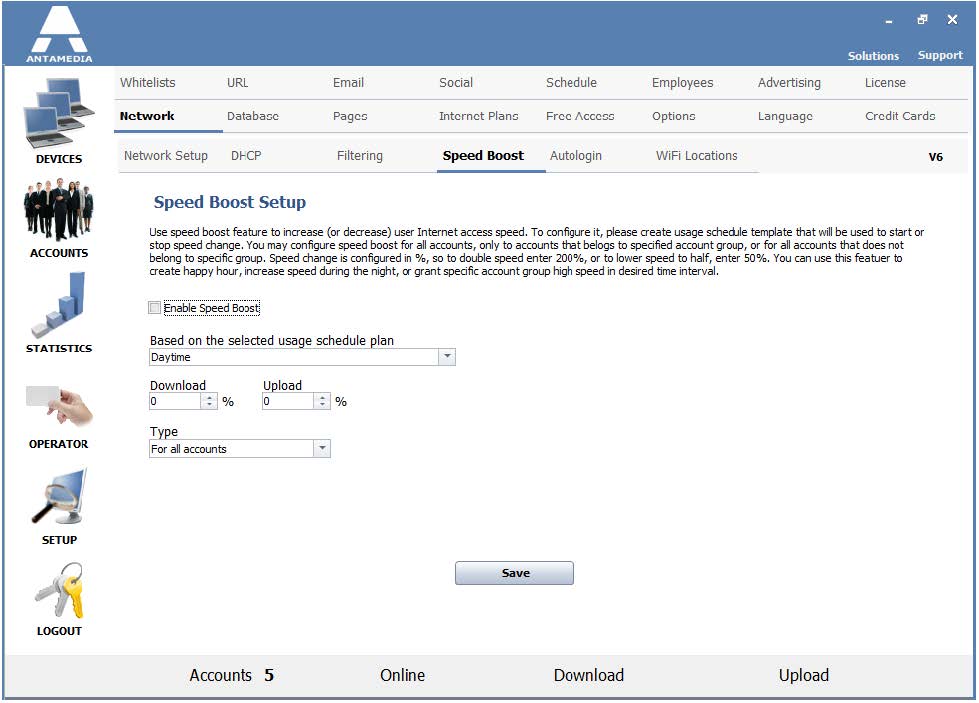
You may configure speed boost in several ways:
· for all accounts,
· only for accounts that belong to a specified account group,
· or for all accounts that do not belong to a specific group.
Speed change is configured in %.
To double speed, please enter 200%, or to lower speed to half, enter 50%.
Enable Speed Boost – Select it to activate speed boost.
Based on the selected usage schedule plan – From the drop-down menu select the usage schedule plan that will be used for a speed boost.
Download – Set download speed boost in percents.
Upload – Set upload speed boost in percents.
Type – From the drop-down menu select the type of accounts to which speed boost will apply (for all accounts, only for account group or for all accounts except group).