
Welcome page
From the Splash page / Welcome tab you have the ability to allow the Welcome page after login, ask customers to like your Facebook page or to share the individual post on Facebook, show video or image ad, and many more.
10,000+ Active Users
99.9% Uptime SLA
24/7 Support
500+ Integrations
Welcome
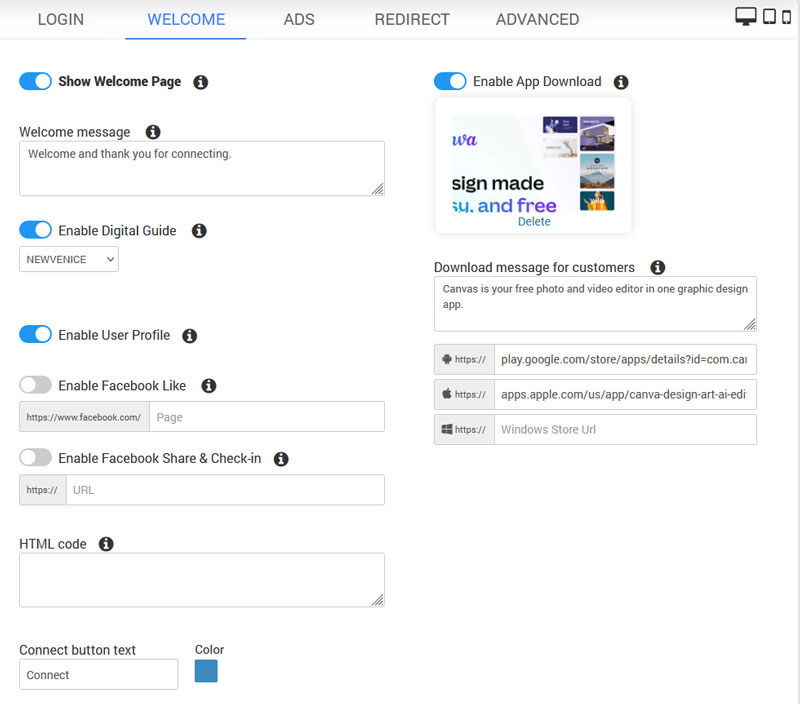
Show Welcome Page Show page to visitors before connecting to WiFi. This prevents page to be closed in some mobile devices so you can show additional info or ask user to take desired action.
Welcome message Write a welcome message to your visitors, and optionally ask them to like or share your page.
Enable Ads (Marketing Campaigns) Show video or image ad defined in Marketing Campaigns. Visitors will have to play video before connecting to WiFi or wait defined time while image is displayed. When multiple campaigns are created, videos and images will rotate each time welcome page is displayed.
Show Ads in fullscreen Show video or image ads in fullscreen for maximum effect.
Enable App Download This feature shows the app download link on visitor's device before WiFi access is granted. You can configure the message and background (400px). To show multiple apps (or ads) that rotate for each new visitor, use Enable Ads (Marketing Campaign) instead of this feature. Create campaign ads and configure App download links for every ad.
Enable Digital Guide Digital Guide improves the guest experience by offering a selection of excursions, activities, restaurants, services and online store. It's displayed on the welcome page where the user can explore it while waiting for the countdown timer to get WiFi access. It can also work without splash page through QR code scan. This new platform is free to try for all existing customers. Contact us for more details and help with setup.
Facebook Like Ask visitors to like and share the Page before connecting to WiFi.
Facebook Share & Check-in Ask visitors to publish an individual story to their timeline and check-in before connecting to WiFi.
Enable User Profile Show a button to access User profile where customers can see personal data, in accordance with GDPR. Customers can easily remove consent on marketing emails, edit their data or remove undesired data. In addition, the customer can see account limits, available time and quota, download and upload speeds assigned.
HTML code Add your custom HTML code for ads, tracking, or custom purposes. You need to whitelist all servers used in the script.
Connect button text For example, you can type Login or Connect and this text will be on the Welcome page connect button.
Ads
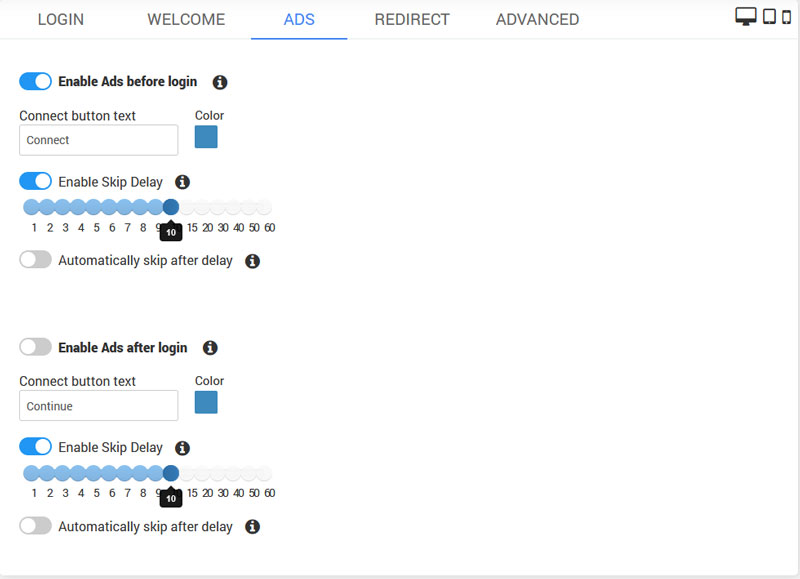 Enable Ads before or after login
Display a video or image advertisement as specified in Marketing Campaigns. Visitors are required to watch the video before connecting to WiFi or wait for a set duration. If multiple campaigns are active, the advertisements will rotate with each display.
Enable Skip Delay A countdown timer shows users how long they must view an advertisement before proceeding.
Automatically skip after delay Automatically proceed to the login page after the countdown timer.
Campaign with Ads must be configured for this option.
Redirect
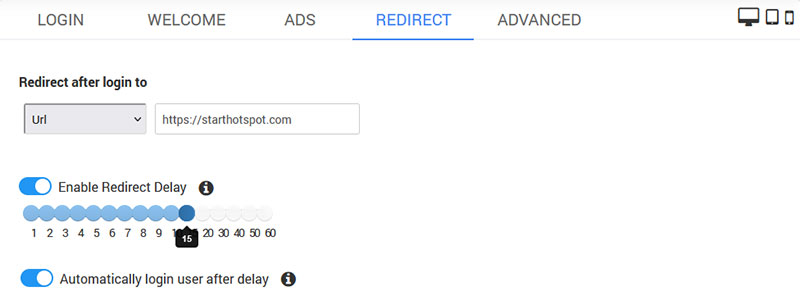
Redirect after login to Select User Profile, Original URL or URL to redirect user after login to.
Redirect Delay When a visitor lands on the welcome page, enable a redirect countdown delay to force the visitor to pay attention to the page content before connecting to the WiFi.
Automatically login The visitor will get WiFi access after the countdown. If disabled, the visitor needs to click the button to connect.
Advanced
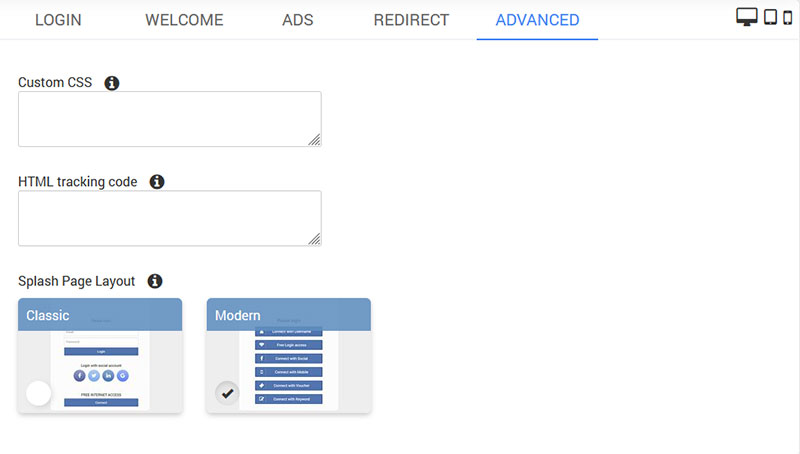
Custom CSS Add your custom CSS code to customize page layout and branding.
HTML tracking code Add your custom HTML tracking code. You need to whitelist all servers used in the script.
Splash Page Layout You can choose a Classic layout to display login methods on the Splash page, or choose Modern to show multiple login methods as a button selection.
Was this article helpful?
Yes
No